Import your exchange export – no API key needed
Instead of typing in every purchase, simply upload your exchange’s trade history. CryptoCompass detects the columns itself, shows you a preview and takes over all purchases and sales with date, price and fee – so your profit, value history and tax report are correct from the start.
What you can do with it
How the import works
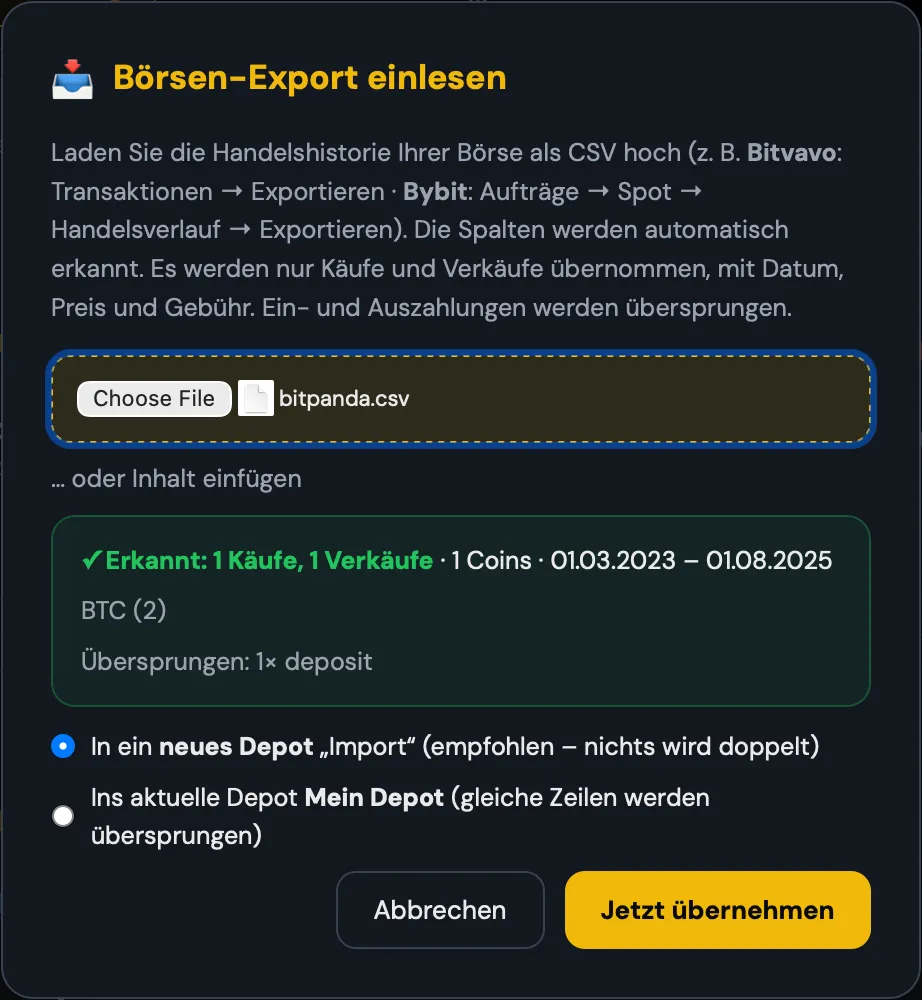
You upload the CSV file. COMPASS finds the header row and detects date, buy or sell, coin, amount, price, currency and fee – even with quirks such as amounts that include the unit (“0.01BTC”) or codes such as “XXBTZEUR” at Kraken. Before anything is saved, you see a preview: how many purchases and sales, which coins, which time period and what will be skipped.
Nothing duplicated, nothing lost
By default, the import goes into a new portfolio, for example “Import Bitpanda”. If you add it to an existing portfolio, identical rows are detected and skipped. Deposits and withdrawals as well as staking rewards are not part of the trade history – after importing, briefly compare your holdings with your exchange.
How to get started
- Export your trade history as a CSV from your exchange.
- In the portfolio, tap “Exchange import” and select the file.
- Check the preview and confirm – done.
Your portfolio in one minute instead of one hour
The exchange import is part of the portfolio tracker, included from the COMPASS plan upwards.
View plansFrequently asked questions
Does COMPASS need access to my exchange account?
No. You only upload a file. There is no API key, no login at the exchange and no trading permissions.
What happens to deposits and withdrawals?
They are skipped because they are not purchases or sales. The preview shows you how many rows this affects.
Which export do I need from Binance?
The spot trade history (“Trade History”). The account statement (“Transaction History”) contains no prices – if you upload it, COMPASS tells you which export is the right one.
Can I combine several exchanges?
Yes. You can import each exchange into its own portfolio or bring everything into one portfolio.
More features
CryptoCompass is an educational and analysis tool from Die Kryptoschule (Mag. Klaus Baier, Höhnhart, Austria). Not investment or tax advice. Crypto is high-risk; a total loss is possible. The images show a sample portfolio.